OFFICIAL MIGOS AI BLOG · TOOL COMPARISON
9 Hotel Lobby AI Video Generators Compared (2026)
This is the official Migos AI blog. Compare nine Hotel Lobby AI video tools by their published workflow, photo requirements, prompts and credit conditions.
Disclosure: We build Migos AI and place it first as our editorial choice for a built-in two-photo workflow. This order is not an independent quality ranking. We have not run a standardized generation test across these tools and do not assign numerical scores.
By Migos AI editorial team · Official product pages checked . Prices, models and trial conditions can change.
Compare the inputs, prompts and free conditions
| Tool | Free conditions / credits | Prompt | Input | Who it may suit |
|---|---|---|---|---|
| Migos AI — our tool | 10 welcome credits once; not enough for a video. Videos start at 50 credits. | No prompt to write | Two separate photos, one for each side | People seeking a dedicated duo template with selectable output settings |
| Media.io | The Hotel Lobby page does not specify a free allowance or price. | Required in the published workflow | Two separate photos; one subject per image | Creators who want to direct the scene with a prompt |
| LightX | Platform free credits exist; eligibility for this template is unconfirmed. | No, according to the template page | One clear portrait; add a second for a duo | People who prefer choosing a template to writing a prompt |
| Renoise | Follow its account for 20 credits: one default, watermarked, silent clip. | No prompt needed | Two portraits, or one photo containing both subjects | People trying a short clip or starting from a shared photo |
| Dreamina | A free entry point is advertised; this workflow’s free allowance is unspecified. | Required in the published workflow | Two separate, authorized reference photos | Creators who want to direct alternating actions and composition |
| VideoTok | The guide is free to read; generation uses credits. | Describe the intended replacements | An authorized source video plus replacement reference photos | Editors who already have footage they may modify |
| Mitte | Paid: the page requires at least the Creative plan. | Optional appearance instructions | Two photos, one for each performer | People seeking a fixed performance-swap workflow |
| AIReel | Paid credit-based effect; the quote appears before generation. | Preset workflow; no complex prompt described | Two separate, well-lit, front-facing photos | Creators who want a preset duo scene, including pet pairings |
| Summrs | 50 signup credits; whether they cover this template is unspecified. | The template tutorial does not require a written prompt | One clear photo showing the face and upper body | People choosing between standard and extended template versions |
“Unspecified” means the reviewed pages did not establish that condition. Platform free credits do not necessarily cover a Hotel Lobby video. Follow each product’s source link below and check the quote before generating.
1. Migos AI: a built-in two-photo Hotel Lobby workflow
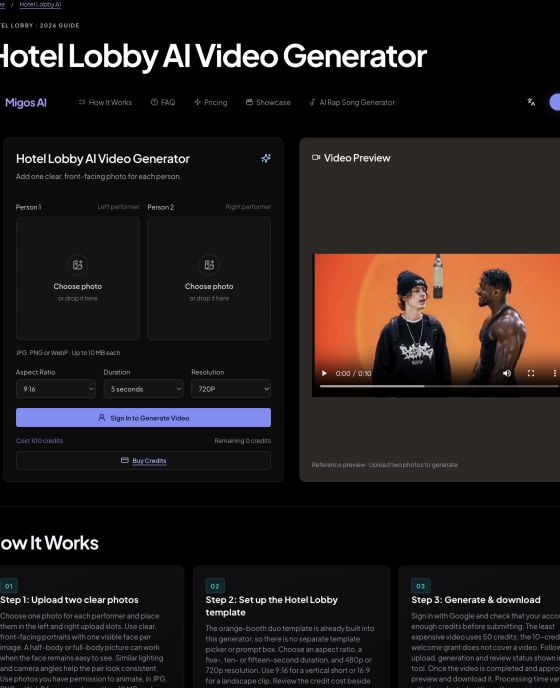
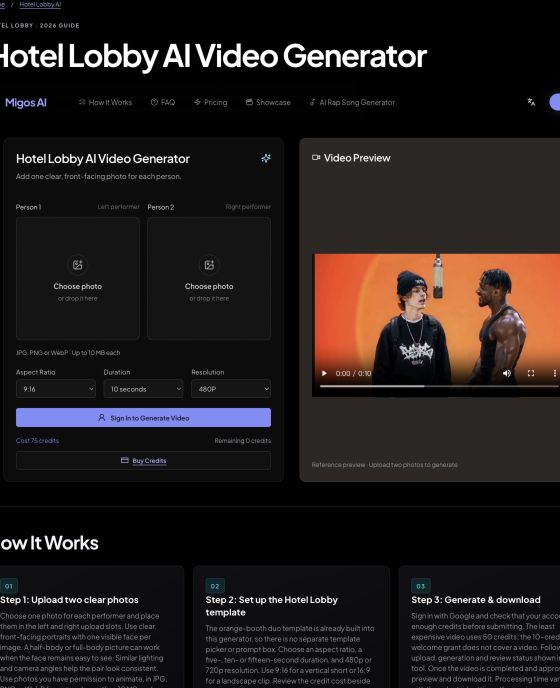
Our Hotel Lobby AI Video Generator combines two separate photo references into a newly generated duo performance. The scene instructions are built in: there is no prompt box or separate template selection step. Upload the left and right performer, choose the output settings, and review the displayed credit cost. This is the workflow we recommend for someone whose main goal is making this particular two-person scene.
You can choose 9:16, 16:9, 4:3 or 3:4, a duration of 5, 10 or 15 seconds, and 480p or 720p resolution. These are output choices, not promises about processing speed. A generated clip may vary in movement, facial details and staging; it is not a frame-by-frame copy of the COLORS performance.
Understand the credits before uploading
New accounts receive 10 welcome credits once, which is not enough for the 50-credit minimum video. The lowest-cost option is 5 seconds at 480p for 50 credits. The generator initially selects 5 seconds at 720p, costing 100 credits. Longer clips or higher resolution require more credits. Sign in with Google and review current credit packs before deciding whether to generate.
How to make a Hotel Lobby AI video on Migos AI
- Open the generator and prepare two photos. Visit the Hotel Lobby generator. Use a clear, front-facing photo of each participant, with one visible face per image and permission to animate it. JPG, PNG and WebP are accepted, up to 10 MB each. If both people are in one picture, prepare two separate crops first.
- Assign the left and right performers. Add Person 1 to the left upload slot and Person 2 to the right. Check the previews for the correct identity and clear framing. Similar lighting helps the references work together. Half-body or full-body images are useful when the face remains large enough to recognize.
- Choose the format and check the cost. Start with 9:16 for a vertical social clip. Select the duration and resolution that fit your budget; 5 seconds at 480p uses 50 credits. The cost and remaining balance appear below the generation controls, so review them after changing settings.
- Sign in and generate. Use Google sign-in and make sure the account balance covers the displayed cost. Click Generate Video, then follow the upload, review and generation status. Completion time depends on processing and the service queue. Avoid submitting another copy while the current job is still running.
- Preview, inspect and download. Once the result is completed and approved, watch the full clip. Check both identities, hands, side placement and motion before downloading. You can also revisit completed results in My Videos. Add a soundtrack separately when needed, using audio you have permission to publish.
Where this workflow fits—and its limits
The main advantage is a short setup process for a specific scene: two upload slots, a built-in template and visible output costs. There are no separate camera or choreography controls. If you need to preserve exact movements from an existing clip or direct a different environment, compare the source-video and prompt-based options below.
Our reference gallery explains the visual format; it is not a record of standardized tests from this tool. For photo preparation and further details, read the photo requirements and Hotel Lobby guide.
Eight other Hotel Lobby tools and workflows
These summaries describe each vendor’s published offering, including its stated limits. They are not hands-on output reviews. The order follows our comparison list rather than a measured quality score.
2. Media.io
Media.io describes a two-photo workflow for an orange-booth duo performance. Its guide emphasizes separate identities, fixed left and right positions, a hanging microphone and alternating gestures. Friends, couples and pets are among the suggested pairings. This is a useful starting point for someone who wants to describe the scene and adjust the performance through written instructions.
The published workflow asks you to paste a prompt, so allow time for setup and review. It recommends well-lit, unobstructed faces with as much of the body visible as possible. The specialist page does not establish a free generation allowance, exact price or whether signing in is mandatory before generation.
Official source: Media.io Hotel Lobby page. Checked October 2, 2026.
3. LightX
LightX presents Hotel Lobby as a template-based photo-to-video workflow: upload a portrait, choose the effect and generate. Its page explicitly says no text prompt is required and describes both solo and duo options, along with a longer performance version. For a two-person clip, add a second clear portrait. This suits someone who wants a guided starting point with fewer scene-writing decisions.
LightX advertises platform-level free credits, but the pages reviewed do not confirm that those credits cover this particular template. Check the current generation quote and export conditions first. The specialist page also leaves the exact duration, resolution and mandatory sign-in step unspecified.
Official source: LightX Hotel Lobby page · LightX pricing. Checked October 2, 2026.
4. Renoise
Renoise generates a new orange-booth performance from two portraits or one photo containing both subjects. Its default is a four-second, 480p, vertical 9:16 clip costing 20 credits, with no prompt to write. The page offers 20 credits after following its account, making the published entry offer easy to understand. It also states that uploads are stored only after sign-in and generation.
The free clip is watermarked and silent, so audio requires a separate step. Longer or sharper settings cost more. Renoise explicitly distinguishes this workflow from copying the original choreography: it generates new movements rather than preserving the source performance frame by frame.
Official source: Renoise Hotel Lobby page. Checked October 2, 2026.
5. Dreamina
Dreamina’s guide uses two separate reference photos and a complete prompt to generate an original orange-booth performance. The published instructions select Seedance 2.5 and a vertical 9:16 canvas, then define which subject leads and which reacts. That makes it a useful option for creators who want to direct composition and timing instead of relying entirely on a fixed template.
Expect to write instructions and inspect identity consistency, hands, feet and side placement. Dreamina displays a free entry point and paid plans, but the reviewed page does not establish a free allowance for this specific workflow. Final pricing details require sign-in, so verify the quote before generating.
Official source: Dreamina Hotel Lobby page. Checked October 2, 2026.
6. VideoTok
VideoTok offers a guide to using its Swap Editor with your own authorized source footage. Sign in, choose a workspace, upload the video, add replacement references and describe which subject each reference should replace. This approach can suit someone who already has a scene and wants to work from it instead of generating an entirely new orange-booth performance.
It is not a preloaded Hotel Lobby template, and the guide says a reliable one-click two-person preset has not been verified. Original performance footage and music are not included. Reading is free, but generation consumes credits; input limits, pricing and processing time depend on the selected editor settings.
Official source: VideoTok Hotel Lobby page. Checked October 2, 2026.
7. Mitte
Mitte’s Hotel Lobby Character Swap page describes a 30-second two-person replacement that retains the original room, choreography and audio. You supply one photo for each side; optional text changes clothing, hair or accessories. Clear, forward-facing, waist-up or full-body references help communicate both identity and outfit. This is a focused choice when preserving the source performance is the intended workflow.
The page requires at least the Creative plan, listed at $36 per month when checked. It does not allow changing the room, song or moves within this app. Its claim that original audio is included is not itself evidence that users receive permission to publish that music.
Official source: Mitte Hotel Lobby page · Mitte pricing. Checked October 2, 2026.
8. AIReel
AIReel provides a preset Hotel Lobby scene with the orange booth, hanging microphone and two-person framing already prepared. Its instructions ask for one well-lit, front-facing image per performer, then generation and review. The page supports people, characters and pets, and describes using different photos of the same person in both roles. That gives creators several casting options without building the scene themselves.
This particular effect is paid and consumes credits; the required amount appears before generation. Audio depends on the template version, while watermark-free export depends on the plan and settings. The page does not promise a fixed completion time, so check the generator rather than assuming an instant result.
Official source: AIReel Hotel Lobby page. Checked October 2, 2026.
9. Summrs
Summrs presents standard and extended Hotel Lobby templates, with a one-photo workflow that handles face placement and lighting matching. Its tutorial recommends a clear, evenly lit photo showing your face and upper body, either front-facing or at a slight angle. This can suit someone who wants to select a performance version and supply a reference rather than prepare source footage.
New signups receive 50 credits without a credit card, but the reviewed pages do not state the exact Hotel Lobby template cost. Do not assume the allowance guarantees a finished free video. The tutorial describes processing in minutes, but we have not benchmarked its speed or output quality.
Official source: Summrs Hotel Lobby page · Summrs Hotel Lobby tutorial. Checked October 2, 2026.
Which workflow should you choose?
Start with the input you already have. Two separate portraits work with Migos AI and several dedicated templates. Renoise also describes accepting a shared photo. VideoTok asks for source footage as well as replacement references. Mitte describes a fixed performance swap, while Media.io and Dreamina give you more scene direction through written prompts.
Next, separate the cost of trying the interface from the cost of producing a video. A signup reward, a free guide or a free button does not establish a free export. Check the required credits, watermark conditions, audio and account requirements before submitting. If exact timing or choreography matters, verify whether the tool generates new movement or works from existing footage.
For the visual reference, see COLORS’ official Quavo & Takeoff performance, published June 17, 2022. That date belongs to the original performance; this article does not claim a verified start date for the AI trend. Migos AI is independent and is not affiliated with the artists or COLORS.
Create your Hotel Lobby AI video
Two photos. A built-in duo template. No prompt to write.
Open the Hotel Lobby AI Video GeneratorSign-in and credits required. Check the cost before generating.